What it does
Drop in a song, get back a folder full of stuff you can use in FL Studio, Traktor, or any DAW. The skill is local (no cloud), runs on the CPU, and finishes a 4-minute track in about 5 minutes including stem separation.
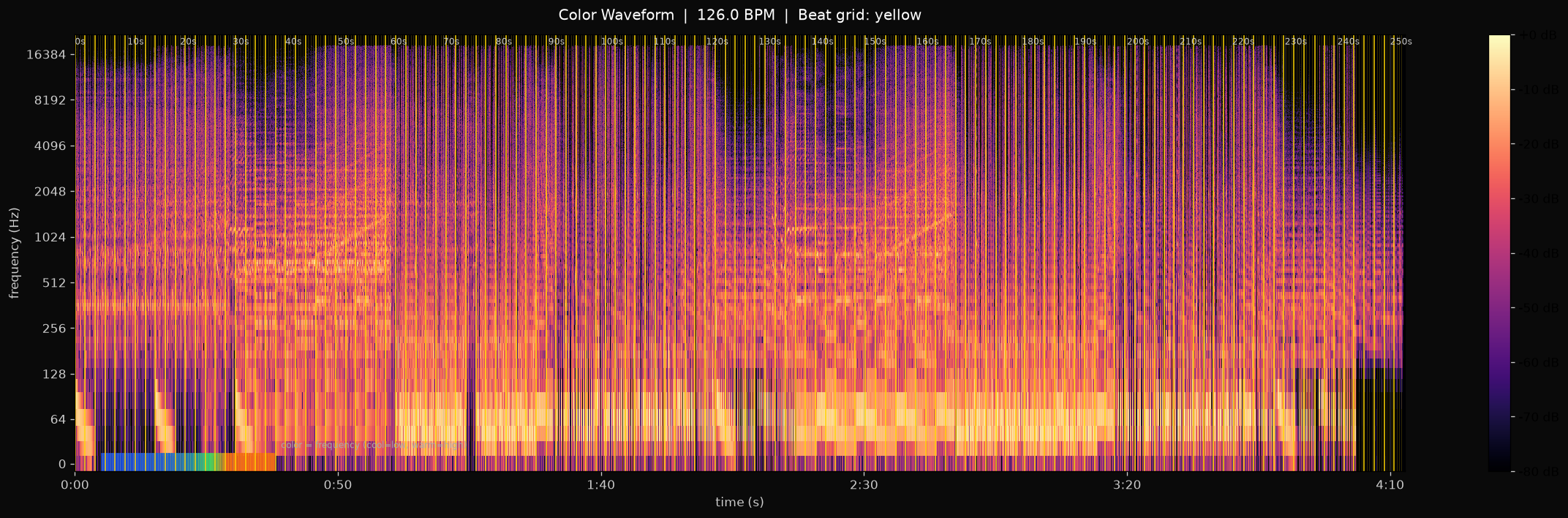
Color waveform
The full track as a log-frequency spectrogram. Frequency is mapped to color (cool = low, warm = high). Every detected beat gets a yellow tick — large for downbeats (every 4th), faint for off-beats. Time stamps every 10 seconds.
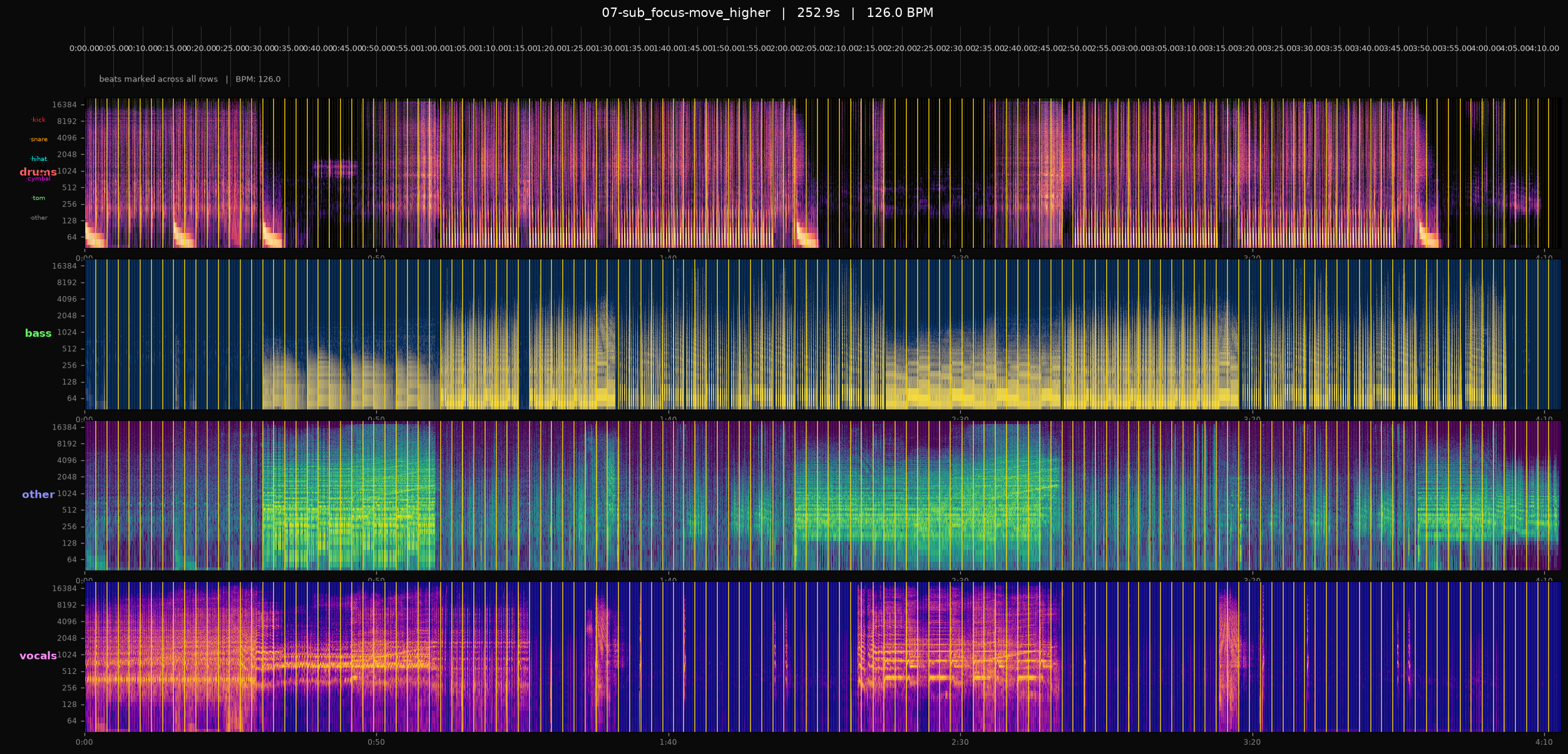
Stem contact sheet
All four stems (drums, bass, other, vocals) stacked vertically on a shared time axis, with beat ticks running through every row so you can see what lands on each beat across the whole mix. The bass row carries serious energy here — that deep sub is what gives Sub Focus his signature weight.
Beat builder
Click a cell in the grid to toggle a hit. Hit "Play" to loop your pattern at the song's tempo. The sounds come from the real one-shots extracted from the track's drums stem.
Soundboard
Click a pad to play a single hit. The one-shots are individual drum hits extracted from the track. The stem previews are 30-second clips starting at 0:30 (skipping the intro).
Drum one-shots
Each is a single hit, ~280ms. Drop them into your sampler.
Stem previews (30s each, starting at 2:10)
All clips start at 2:10 — that's the good-mix-of-everything section. The first pad is the original track, then the four separated stems. A/B between them to hear what HTDemucs pulled apart.
Pipeline
Eight stages run in order. The first five are fast (under a minute on a 4-minute track). Stem separation is the bottleneck — about 1.2x real-time on CPU.
Quick start
All outputs go to analysis/<track-name>/ next to the input file (or use --out <dir> to override).
# Fast pipeline (BPM, key, features, waveform, beat MIDI, cues, melody)
# ~15-30 seconds for a 2-minute track
python analyze.py path/to/track.mp3

# Full pipeline including stem separation
# ~3-5 minutes for a 2-minute track on CPU
python analyze.py path/to/track.mp3 --stems

# Skip the slow stuff
python analyze.py path/to/track.mp3 --no-melody --no-stems

# Speed up stem separation (lower quality)
python analyze.py path/to/track.mp3 --stems --shifts 0 --overlap 0
SKILL.md
The full skill specification, copy-pasted from skills/audio-analyzer/SKILL.md.
# audio-analyzer

Analyze an MP3 (or any audio file) into:
- BPM + beat grid
- Musical key (Krumhansl-Schmuckler)
- Spectral / energy / loudness fingerprint
- Color waveform PNG with beat ticks and section markers
- Traktor hot-cue CSV
- Beat-grid MIDI (for FL Studio)
- Melody MIDI via basic-pitch
- 4-stem separation via HTDemucs (CPU, slow)

All outputs go into a per-track subfolder.

## When to use

When the user says things like:
- "Analyze this track"
- "What's the BPM / key of this song"
- "Split this into stems"
- "Make a Traktor-ready CSV from this MP3"
- "Render a color waveform"
- "Extract the melody as MIDI"

## Quick start

    # Just the fast analysis (BPM/key/waveform/MIDI/CSV) — no stem separation
    python .openclaw/workspace/skills/audio-analyzer/analyze.py path/to/track.mp3

    # Full pipeline including HTDemucs (slow on CPU: ~10-30 min for 4-min track)
    python .openclaw/workspace/skills/audio-analyzer/analyze.py path/to/track.mp3 --stems

    # Skip the slow stuff
    python .openclaw/workspace/skills/audio-analyzer/analyze.py path/to/track.mp3 --no-melody --no-stems

Outputs go to `analysis/<track-name>/` next to the input (or `--out <dir>`).

## Outputs

For input `foo.mp3`:
- `analysis/foo/analysis.json` — full structured result (BPM, key, beats, features)
- `analysis/foo/waveform.png` — color waveform with beat ticks + section marks
- `analysis/foo/beats.mid` — MIDI file with one note per beat (FL Studio)
- `analysis/foo/cues-traktor.csv` — Traktor hot-cue CSV (cue #, time, type, comment)
- `analysis/foo/melody.mid` — melody extracted by basic-pitch (if enabled)
- `analysis/foo/stems/{drums,bass,vocals,other}.wav` — HTDemucs output (if enabled)
- `analysis/foo/stems/drum-split/oneshots/{kick,snare,hihat,cymbal,tom}/*.wav` — per-hit one-shots
- `analysis/foo/stems/drum-split/tracks/{kick,snare,hihat,cymbal,tom}.wav` — per-piece continuous tracks
- `analysis/foo/stems/drum-split/drum-kit-multitrack.wav` — all pieces in one multichannel WAV
- `analysis/foo/stems/drum-split/drum-hits.csv` — every detected hit with time + label
- `analysis/foo/stem-contact-sheet.png` — all 4 stems stacked vertically with aligned beat ticks + time stamps

## Dependencies (already installed in this env)

- librosa 0.11.0
- soundfile 0.14.0
- matplotlib 3.11.1
- basic_pitch 0.4.0
- demucs 4.1.0
- torch 2.7.1+cu118
- numpy, scipy, numba

## Important runtime notes

- **CPU only** on this host. The Vega iGPU is not in torch's CUDA allowlist, so do NOT pass `--device cuda` to demucs. The script forces `device=cpu`.
- HTDemucs first run downloads ~80 MB of model weights to `~/.cache/torch/hub/`.
- basic-pitch first run downloads ~10 MB of model weights.
- Stem separation on CPU: ~10-30 min for a 4-min track. Use `--shifts 0 --overlap 0` to speed up if quality is acceptable.
- This script NEVER uses random network calls beyond the initial model downloads.

## Files

- `analyze.py` — orchestrator
- `stage_bpm_key.py` — BPM + key + beat grid
- `stage_features.py` — spectral/energy features
- `stage_waveform.py` — color waveform render
- `stage_midi.py` — beat-grid MIDI
- `stage_melody.py` — basic-pitch melody extraction
- `stage_stems.py` — HTDemucs 4-stem
- `stage_drum_split.py` — split drums into kick/snare/hihat/cymbal/tom
- `stage_contact_sheet.py` — render all stems stacked with aligned beats
- `stage_cues.py` — Traktor hot-cue CSV
Outputs from this run
Every run writes its results to analysis/<track-name>/. The folder for the track on this page (move-higher) contains:
analysis/move-higher/
├── analysis.json              # full structured result
├── beats.mid                  # 532-beat kick+snare pattern for FL Studio
├── cues-traktor.csv           # 7 hot cues + 4-beat loop suggestion
├── melody.mid                 # 629 notes via basic-pitch
├── waveform.png               # color spectrogram (shown above)
├── stem-contact-sheet.png     # all stems aligned (shown above)
└── stems/
    ├── drums.wav              # 22 MB
    ├── bass.wav               # 22 MB
    ├── other.wav              # 22 MB
    ├── vocals.wav             # 22 MB
    └── drum-split/
        ├── oneshots/          # 1062 individual hit WAVs by category
        ├── tracks/            # per-piece continuous WAVs
        ├── drum-hits.csv      # every detected hit with time + label
        ├── drum-kit-multitrack.wav
        └── drum-split-summary.json